COUPONS & GIFTCARDS
JOBVIZER CRM VIDEO TUTORIAL
What Coupons & Gift Cards Do
Coupons apply a discount to a product or service at checkout, useful for promotions, seasonal offers, and increasing conversion on a payment link, order form, or booking. Gift Cards let customers purchase a branded digital card for themselves or someone else, generating revenue immediately while the service is redeemed later. Both are managed directly inside the Payments section, no separate discount or gift card app required.
Creating a Coupon
Go to Payments → Coupons.
Click Create Coupon.
Enter the basic details:
Coupon Name — internal reference name
Coupon Code — what the customer actually enters at checkout
Select the Coupon Type:
Percentage-based — a percent off the total (e.g., 10% off)
Fixed amount — a flat dollar amount off
Set the usage rules: how many total times it can be used, whether it's limited to one use per customer, and a validity window (start and expiry dates).
Choose which products or services it applies to.
Save.
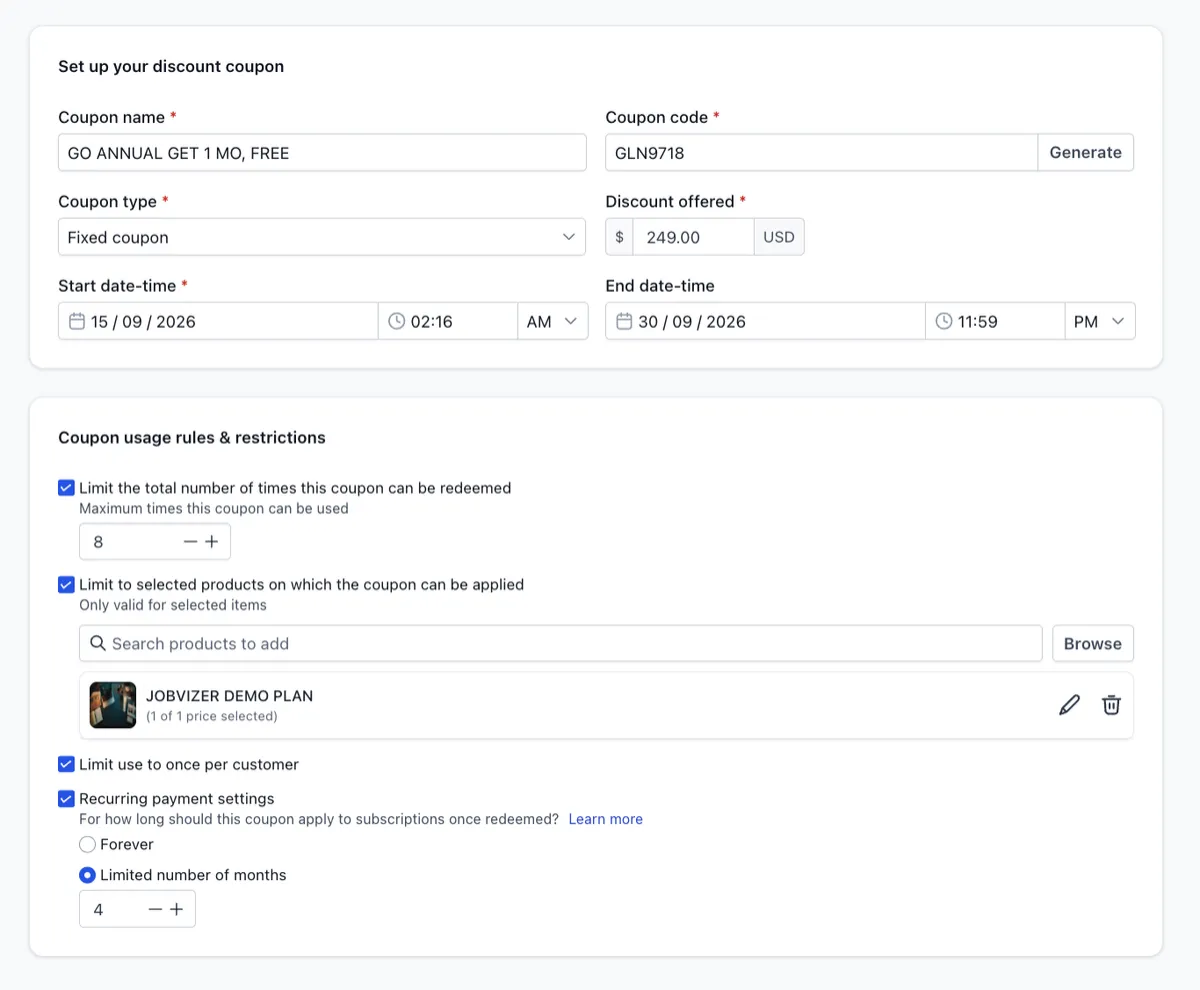
Creating a Coupon
Go to Payments → Coupons.
Click Create Coupon.
Enter the basic details:
Coupon Name — internal reference name
Coupon Code — what the customer actually enters at checkout
Select the Coupon Type:
Percentage-based — a percent off the total (e.g., 10% off)
Fixed amount — a flat dollar amount off
Set the usage rules: how many total times it can be used, whether it's limited to one use per customer, and a validity window (start and expiry dates).
Choose which products or services it applies to.
Save.
Gift Cards
What You Need First
Gift cards require an active payment processor. This feature currently works with Stripe or PayPal, and Stripe is generally the more reliable option with more detailed reporting.
Creating a Gift Card
Go to Payments → Gift Cards.
Click Create Gift Card.
Give it a clear name and description.
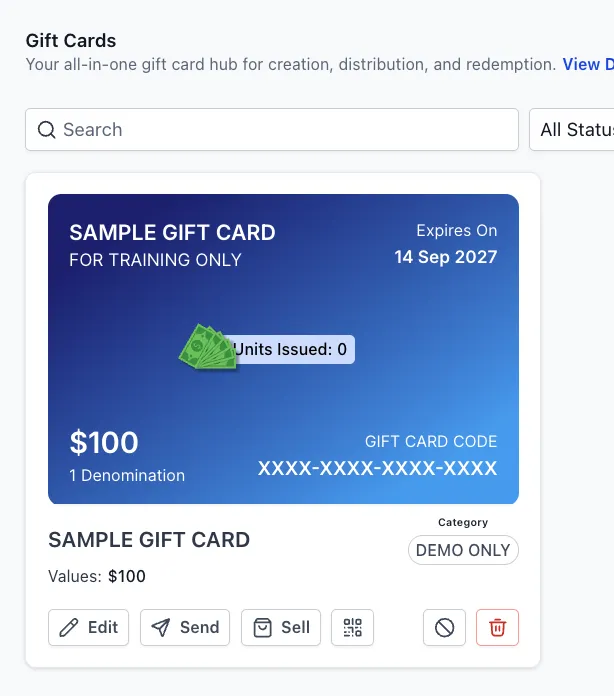
Design the card: use a color gradient or upload custom branded artwork, ideally matching your brand colors and logo so it looks professional.
Choose the denominations you want to sell (e.g., $25, $50, $100). You can also enable a custom "Enter Amount" option so buyers can choose any amount.
Optionally set an expiration date (e.g., 12 months from purchase), and link your Terms and Conditions for legal clarity.
Save. Every gift card created gets its own dedicated checkout link automatically.
Ways to Sell or Share a Gift Card
Direct link — share in a newsletter, social bio, or a direct message
Embed code — place the checkout directly on a website page
QR code — print and display at a front desk or checkout counter for walk-in purchases
Email/SMS — send directly to a contact, including as a loyalty reward or complimentary credit
Tracking
Every gift card issued is automatically tracked under Gift Card Orders, giving full visibility into balance, status, and redemption history for each card sold.
Automating Around Expiry
If an expiration date is set, a workflow can be triggered as a card approaches that date, for example, sending a reminder email 30 days before expiry with a direct link to book or redeem, encouraging use before the balance is lost.
How Discounts Are Calculated
The discount applies to the total order value (quantity × price). For example, a $20 product purchased at 5 units with a 10% coupon discounts $10 off the $100 total, not $10 off a single unit.
For subscriptions, a coupon can be configured to apply once, for a set number of billing cycles (e.g., the first 3 months), or indefinitely, depending on how it's configured at creation.
Note: Editing a coupon's name, limits, or validity after creation only affects future uses, not transactions that already happened under the original settings.
JOBVIZER MARKETING SUPPORT PORTAL© 2026ALL RIGHTS RESERVED